User Login
Login Process Flow
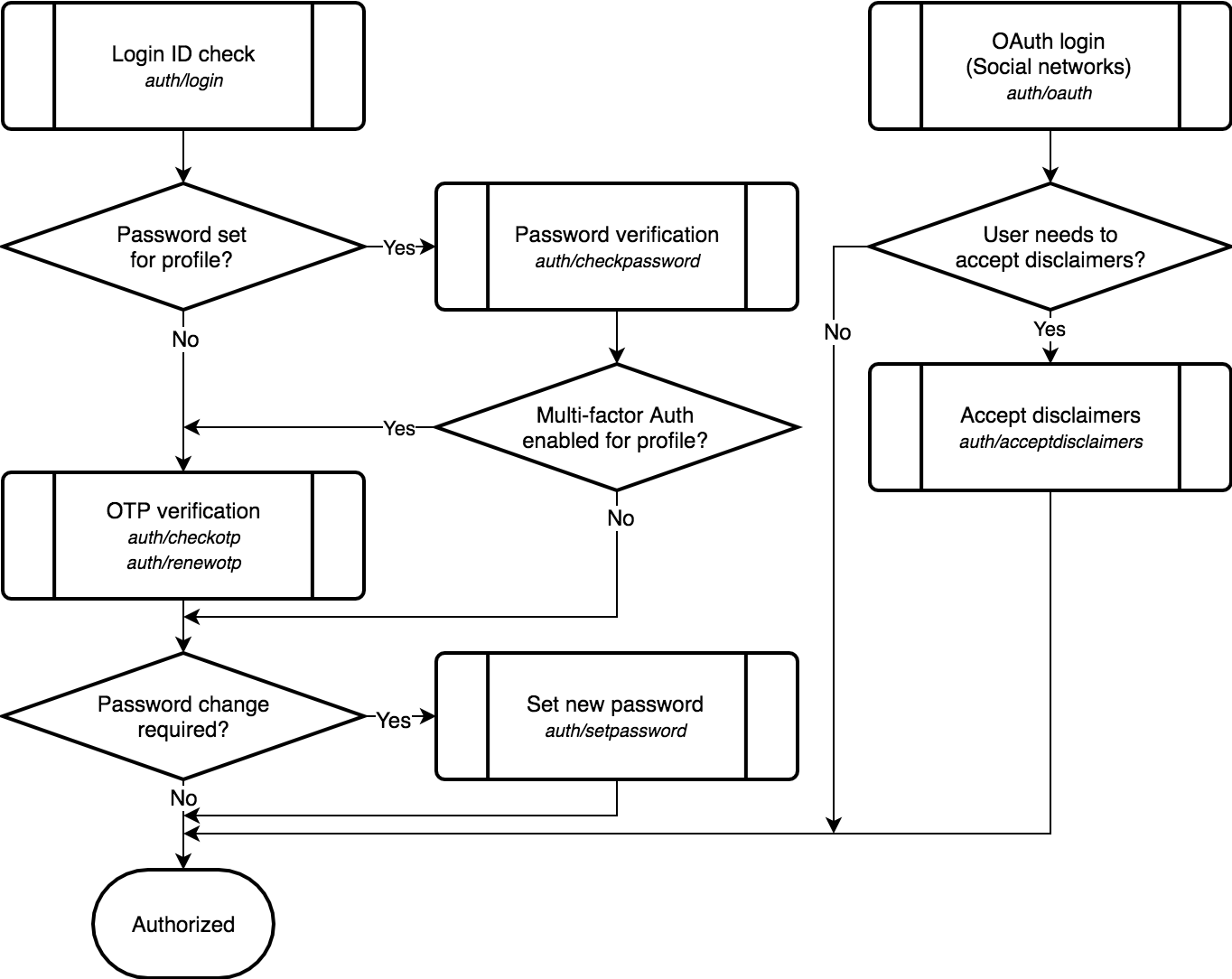
During password or OTP verification, user also needs to accept disclaimers if required. Separate
auth/acceptdisclaimers endpoint is used only with OAuth login.
Check Login ID
-
POST/(company_code)/v2/auth/login¶ User login (login ID verification)
Verifies user login ID (can be primary phone, primary email, or a separate login name depending on user role) and issues a temporary user session token for further authentication. This token is returned in
session_tokenresponse field and must be used when calling respective authentication endpoints.If user profile for supplied login ID is not found, returns
auth.loginid.notfounderror code with HTTP status code 404.If user authorization for supplied login ID is restricted, returns
auth.user.restrictederror code with HTTP status code 403.If user profile for supplied login ID is closed, returns
auth.user.closederror code with HTTP status code 403.If service is administratively denied for supplied login ID, returns
auth.user.deniederror code with HTTP status code 403.If user profile has a password set,
session_stateresponse field will be set tocheckpassword. Client application should callauth/checkpasswordendpoint next supplying received session token.If user profile does not have a password set,
session_stateresponse field will be set tocheckotp. Client application should callauth/checkotpendpoint next supplying received session token and one-time SMS code entered by user.If user needs to accept legal disclaimers,
disclaimers_requiredarray in response will contain data of required disclaimers.auth/checkpasswordandauth/checkotpendpoints will not succeed unless supplied list of accepted disclaimers contains codes of all required disclaimers.Request JSON Object: - login_id (string) – User login ID (primary phone, primary email, or a separate login name)
Response JSON Object: - status (string) –
successorerror - error_code (string) – (Optional) If
statusiserror: one of error codes listed below - session_token (string) – User session token
- session_state (string) – User session state:
checkpasswordorcheckotp. See User Sessions - disclaimers_required (array) – Array of data objects of legal disclaimers that user needs to accept
- captcha_required (boolean) – (Optional) If
session_stateischeckpassword:trueif next request must havecaptcha_responsefield set - user_phone (string) – (Optional) If
session_stateischeckotp: masked user’s phone number
Disclaimer fields
Each member of
disclaimers_requiredresponse array is an object with following fields:Field name Type Nullable Description code string No Disclaimer code title string No Disclaimer title for display description string No Short disclaimer description link string No URL for link to legal disclaimer text Error codes used
- auth.apikey.missing
- auth.apikey.invalid
- auth.loginid.notfound
- auth.user.restricted
- auth.user.closed
- auth.user.denied
- auth.restricted
- request.validation.failed
See Error Codes for details.
Check Password
-
POST/(company_code)/v2/auth/checkpassword¶ Check user password for authentication
If invalid password was supplied,
auth.password.invaliderror code is returned. If there were several previous failed attempts,captcha_requiredresponse field is set totrue. Further requests to this endpoint must includecaptcha_responsefield containing valid Recapthca response.If user needs to accept legal disclaimers,
accept_disclaimersarray in request must contain codes of all required disclaimers for this endpoint to succeed. Otherwise,auth.disclaimer.invaliderror code is returned anddisclaimers_requiredresponse field is set to array of required disclaimers.If second factor verification is required, a temporary session token with
checkotpsession state is returned. Client is expected to callauth/checkotpAPI endpoint next using this temporary session token.user_phoneresponse field is set to masked user’s phone number for SMS verification.If user is required to set a new password, a temporary session token with
setpasswordsession state is returned. Client is expected to callauth/setpasswordAPI endpoint next using this temporary session token.If no further authorization actions are required, returned session token will have
authorizedsession state.profile_mnemocoderesponse field will contain the mnemocode of user’s profile for Profile API endpoints.Request Headers: - Authorization –
Bearer <session_token>(session state must becheckpassword)
Request JSON Object: - password (string) – Password entered by user
- captcha_response (string) – (Optional) User captcha response token, as provided by Recaptcha
- accept_disclaimers (array) – (Optional) Array of string codes of disclaimers accepted by user
Response JSON Object: - status (string) –
successorerror - error_code (string) – (Optional) If
statusiserror: one of error codes listed below - captcha_required (boolean) – (Optional) If
statusiserror:trueif next request must havecaptcha_responsefield set - disclaimers_required (array) – (Optional) If
statusiserror: Array of data objects of legal disclaimers that user needs to accept - session_token (string) – User session token
- session_state (string) – User session state:
checkotp,setpassword, orauthorized. See User Sessions - profile_mnemocode (string) – (Optional) If
session_stateisauthorized: Mnemocode of user’s profile - user_phone (string) – (Optional) If
session_stateischeckotp: masked user’s phone number - password_regex (string/null) – (Optional) If
session_stateissetpassword: Regex to check required password quality (check disabled ifnull) - password_regex_description (string/null) – (Optional) If
session_stateissetpassword: Description text for password quality check
Disclaimer fields
Each member of
disclaimers_requiredresponse array is an object with following fields:Field name Type Nullable Description code string No Disclaimer code title string No Disclaimer title for display description string No Short disclaimer description link string No URL for link to legal disclaimer text Error codes used
- auth.apikey.missing
- auth.apikey.invalid
- auth.header.missing
- auth.header.invalid
- auth.token.invalid
- auth.token.expired
- auth.session.invalid
- auth.user.restricted
- auth.user.closed
- auth.user.denied
- auth.captcha.missing
- auth.captcha.invalid
- auth.password.invalid
- auth.disclaimer.invalid
- auth.restricted
- request.validation.failed
See Error Codes for details.
- Authorization –
Check OTP
-
POST/(company_code)/v2/auth/checkotp¶ Check one-time password for authentication
For OTP authentication, a one-time password (code) is sent to user’s primary phone number. API response includes
user_phonefield containing masked user’s phone number. OTP entered by user must be supplied to this endpoint in theotprequest field. If invalid OTP is supplied,auth.otp.invaliderror code is returned.auth/renewotpendpoint must be used to send a new OTP before retrying this endpoint.If user does not have access to phone, they can choose to use a previously generated backup code instead of SMS OTP. This code must be supplied in the
backup_coderequest field. If invalid code is supplied,auth.backupcode.invaliderror code is returned.If user needs to accept legal disclaimers,
accept_disclaimersarray in request must contain codes of all required disclaimers for this endpoint to succeed. Otherwise,auth.disclaimer.invaliderror code is returned anddisclaimers_requiredresponse field is set to array of required disclaimers.auth/renewotpendpoint must be used to send new SMS OTP before retrying this endpoint.If user is required to set a new password, a temporary session token with
setpasswordsession state is returned. Client is expected to callauth/setpasswordAPI endpoint next using this temporary session token.If no further authorization actions are required, returned session token will have
authorizedsession state.profile_mnemocoderesponse field will contain the mnemocode of user’s profile for Profile API endpoints.Request Headers: - Authorization –
Bearer <session_token>(session state must becheckotp)
Request JSON Object: - otp (string) – (Optional) SMS one-time password entered by user
- backup_code (string) – (Optional) Backup code entered by user
- accept_disclaimers (array) – (Optional) Array of string codes of disclaimers accepted by user
Response JSON Object: - status (string) –
successorerror - error_code (string) – (Optional) If
statusiserror: one of error codes listed below - disclaimers_required (array) – (Optional) If
statusiserror: Array of data objects of legal disclaimers that user needs to accept - session_token (string) – User session token
- session_state (string) – User session state:
setpasswordorauthorized. See User Sessions - profile_mnemocode (string) – (Optional) If
session_stateisauthorized: Mnemocode of user’s profile - password_regex (string/null) – (Optional) If
session_stateissetpassword: Regex to check required password quality (check disabled ifnull) - password_regex_description (string/null) – (Optional) If
session_stateissetpassword: Description text for password quality check
Disclaimer fields
Each member of
disclaimers_requiredresponse array is an object with following fields:Field name Type Nullable Description code string No Disclaimer code title string No Disclaimer title for display description string No Short disclaimer description link string No URL for link to legal disclaimer text Error codes used
- auth.apikey.missing
- auth.apikey.invalid
- auth.header.missing
- auth.header.invalid
- auth.token.invalid
- auth.token.expired
- auth.session.invalid
- auth.user.restricted
- auth.user.closed
- auth.user.denied
- auth.otp.invalid
- auth.backupcode.invalid
- auth.disclaimer.invalid
- auth.restricted
- request.validation.failed
See Error Codes for details.
- Authorization –
Renew OTP
-
POST/(company_code)/v2/auth/renewotp¶ Renew one-time password for authentication
A new one-time password (code) is sent to user’s primary phone number.
user_phoneresponse field contains masked user’s phone number.Request Headers: - Authorization –
Bearer <session_token>(session state must becheckotp)
Response JSON Object: - status (string) –
successorerror - error_code (string) – (Optional) If
statusiserror: one of error codes listed below - user_phone (string) – Masked user’s phone number
Error codes used
- auth.apikey.missing
- auth.apikey.invalid
- auth.header.missing
- auth.header.invalid
- auth.token.invalid
- auth.token.expired
- auth.session.invalid
- auth.user.restricted
- auth.user.closed
- auth.user.denied
- request.validation.failed
See Error Codes for details.
- Authorization –
Set Password
-
POST/(company_code)/v2/auth/setpassword¶ Set or change user password
This endpoint is used during authorization or access recovery process when authenticated user needs to set a new password.
If called during authorization (
setpasswordsession state), new session token withauthorizedsession state will be returned.profile_mnemocoderesponse field will contain the mnemocode of user’s profile.If called during access recovery (
recovery-setpasswordsession state), no new session token will be returned. Client application should useauth/loginendpoint next for authorization of user with recovered access.If quality of supplied new password is too low, returns
request.validation.failederror code with HTTP status code 422.Request Headers: - Authorization –
Bearer <session_token>(session state must besetpasswordorrecovery-setpassword)
Request JSON Object: - new_password (string) – New user password
Response JSON Object: - status (string) –
successorerror - error_code (string) – (Optional) If
statusiserror: one of error codes listed below - session_token (string) – (Optional) If session state was
setpassword: User session token - session_state (string) – (Optional) If session state was
setpassword: User session state:authorized. See User Sessions - profile_mnemocode (string) – (Optional) If session state was
setpassword: Mnemocode of user’s profile
Error codes used
- auth.apikey.missing
- auth.apikey.invalid
- auth.header.missing
- auth.header.invalid
- auth.token.invalid
- auth.token.expired
- auth.session.invalid
- auth.password.invalid
- auth.user.restricted
- auth.user.closed
- auth.user.denied
- request.validation.failed
See Error Codes for details.
- Authorization –
Check Credentials
-
POST/(company_code)/v2/auth/checkcredentials¶ Check user credentials for authentication
Verifies user login ID (can be primary phone, primary email, or a separate login name depending on user role) and password for user authentication.
If invalid login_id or password was supplied,
auth.credentials.invaliderror code is returned. If there were several previous failed attempts,captcha_requiredresponse field is set totrue. Further requests to this endpoint must includecaptcha_responsefield containing valid Recapthca response.If user needs to accept legal disclaimers,
accept_disclaimersarray in request must contain codes of all required disclaimers for this endpoint to succeed. Otherwise,auth.disclaimer.invaliderror code is returned anddisclaimers_requiredresponse field is set to array of required disclaimers.If second factor verification is required, a temporary session token with
checkotpsession state is returned. Client is expected to callauth/checkotpAPI endpoint next using this temporary session token.user_phoneresponse field is set to masked user’s phone number for SMS verification.If user is required to set a new password, a temporary session token with
setpasswordsession state is returned. Client is expected to callauth/setpasswordAPI endpoint next using this temporary session token.If no further authorization actions are required, returned session token will have
authorizedsession state.profile_mnemocoderesponse field will contain the mnemocode of user’s profile for Profile API endpoints.If user authorization for supplied login ID is restricted, returns
auth.user.restrictederror code with HTTP status code 403.If user profile for supplied login ID is closed, returns
auth.user.closederror code with HTTP status code 403.If service is administratively denied for supplied login ID, returns
auth.user.deniederror code with HTTP status code 403.Request JSON Object: - login_id (string) – User login ID (primary phone, primary email, or a separate login name)
- password (string) – Password entered by user
- captcha_response (string) – (Optional) User captcha response token, as provided by Recaptcha
- accept_disclaimers (array) – (Optional) Array of string codes of disclaimers accepted by user
Response JSON Object: - status (string) –
successorerror - error_code (string) – (Optional) If
statusiserror: one of error codes listed below - captcha_required (boolean) – (Optional) If
statusiserror:trueif next request must havecaptcha_responsefield set - disclaimers_required (array) – (Optional) If
statusiserror: Array of data objects of legal disclaimers that user needs to accept - session_token (string) – User session token
- session_state (string) – User session state:
checkotp,setpassword, orauthorized. See User Sessions - profile_mnemocode (string) – (Optional) If
session_stateisauthorized: Mnemocode of user’s profile - user_phone (string) – (Optional) If
session_stateischeckotp: masked user’s phone number - password_regex (string/null) – (Optional) If
session_stateissetpassword: Regex to check required password quality (check disabled ifnull) - password_regex_description (string/null) – (Optional) If
session_stateissetpassword: Description text for password quality check
Disclaimer fields
Each member of
disclaimers_requiredresponse array is an object with following fields:Field name Type Nullable Description code string No Disclaimer code title string No Disclaimer title for display description string No Short disclaimer description link string No URL for link to legal disclaimer text Error codes used
- auth.apikey.missing
- auth.apikey.invalid
- auth.captcha.missing
- auth.captcha.invalid
- auth.credentials.invalid
- auth.disclaimer.invalid
- auth.user.restricted
- auth.user.closed
- auth.user.denied
- auth.restricted
- request.validation.failed
See Error Codes for details.
OAuth Login
-
POST/(company_code)/v2/auth/oauth¶ Authenticate user with OAuth provider
Verifies OAuth user authorization code with one of configured OAuth providers and returns a user session token.
If verification with OAuth provider failed, possibly due to invalid
codeorredirect_uri, returnsauth.oauth.failederror code with HTTP status code 401.If user profile for verified user of OAuth provider is not found, returns
auth.oauth.notfounderror code with HTTP status code 404.If user authorization for user authenticated with OAuth is restricted, returns
auth.user.restrictederror code with HTTP status code 403.If user profile for user authenticated with OAuth is closed, returns
auth.user.closederror code with HTTP status code 403.If service is administratively denied for user authenticated with OAuth, returns
auth.user.deniederror code with HTTP status code 403.If user needs to accept legal disclaimers,
session_stateresponse field will be set toacceptdisclaimersanddisclaimers_requiredarray in response will contain data of required disclaimers. Client application should callauth/acceptdisclaimersendpoint next supplying received session token and list of accepted disclaimers.If user does not need to accept legal disclaimers, returned session token will have
authorizedsession state.profile_mnemocoderesponse field will contain the mnemocode of user’s profile for Profile API endpoints.Request JSON Object: - provider_id (integer) – ID of OAuth provider, must be in range of 1 to 5
- code (string) – OAuth code, as received from OAuth provider
- redirect_uri (string) – Redirect URI, as passed to OAuth provider
Response JSON Object: - status (string) –
successorerror - error_code (string) – (Optional) If
statusiserror: one of error codes listed below - session_token (string) – User session token
- session_state (string) – User session state:
authorizedoracceptdisclaimers. See User Sessions - disclaimers_required (array) – (Optional) If
session_stateisacceptdisclaimers: Array of data objects of legal disclaimers that user needs to accept - profile_mnemocode (string) – (Optional) If
session_stateisauthorized: Mnemocode of user’s profile
Disclaimer fields
Each member of
disclaimers_requiredresponse array is an object with following fields:Field name Type Nullable Description code string No Disclaimer code title string No Disclaimer title for display description string No Short disclaimer description link string No URL for link to legal disclaimer text Error codes used
- auth.apikey.missing
- auth.apikey.invalid
- auth.header.missing
- auth.header.invalid
- auth.token.invalid
- auth.token.expired
- auth.session.invalid
- auth.oauth.notfound
- auth.oauth.failed
- request.validation.failed
- auth.user.restricted
- auth.user.closed
- auth.user.denied
See Error Codes for details.
Accept Disclaimers
-
POST/(company_code)/v2/auth/acceptdisclaimers¶ Accept legal disclaimers during authorization
Issues a session token with
authorizedsession state.profile_mnemocoderesponse field will contain the mnemocode of user’s profile for Profile API endpoints.accept_disclaimersarray in request must contain codes of all required disclaimers for this endpoint to succeed. Otherwise,auth.disclaimer.invaliderror code is returned anddisclaimers_requiredresponse field is set to array of required disclaimers.Request Headers: - Authorization –
Bearer <session_token>(session state must beacceptdisclaimers)
Request JSON Object: - accept_disclaimers (array) – (Optional) Array of string codes of disclaimers accepted by user
Response JSON Object: - status (string) –
successorerror - error_code (string) – (Optional) If
statusiserror: one of error codes listed below - disclaimers_required (array) – (Optional) If
statusiserror: Array of data objects of legal disclaimers that user needs to accept - session_token (string) – User session token
- session_state (string) – User session state:
authorized. See User Sessions - profile_mnemocode (string) – Mnemocode of user’s profile
Disclaimer fields
Each member of
disclaimers_requiredresponse array is an object with following fields:Field name Type Nullable Description code string No Disclaimer code title string No Disclaimer title for display description string No Short disclaimer description link string No URL for link to legal disclaimer text Error codes used
- auth.apikey.missing
- auth.apikey.invalid
- auth.header.missing
- auth.header.invalid
- auth.token.invalid
- auth.token.expired
- auth.session.invalid
- auth.user.restricted
- auth.user.closed
- auth.user.denied
- auth.disclaimer.invalid
- auth.restricted
- request.validation.failed
See Error Codes for details.
- Authorization –
Log Out
-
POST/(company_code)/v2/auth/logout¶ User logout (invalidate auth token)
Request Headers: - Authorization –
Bearer <session_token>
Response JSON Object: - status (string) –
successorerror - error_code (string) – (Optional) If
statusiserror: one of error codes listed below
Error codes used
- auth.apikey.missing
- auth.apikey.invalid
- auth.token.invalid
- auth.token.expired
- auth.session.invalid
See Error Codes for details.
- Authorization –